Schemes and pictures to print.
Last update 18/01/09
Paragraphs:

 
Printer colors
 
Click this picture for a larger version

Description:
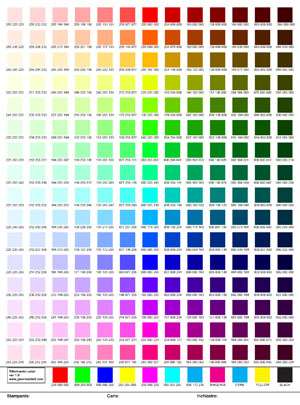
Questa immagini è una raccolta di campioni di colore da stampare per usare al meglio la vostra stampante. Non ha nulla di scientifico ne di complesso, sono solo un mare di colori, ognuno identificabile con la tripletta rgb. Tutto quello che dovete fare è stamparlo e tenerlo a portata di mano quando dovete fare un lavoro che richiede maggiore precisione con i colori.
quante volte avete realizzato un immagine che una volta stampata risultava completamente diversa da come la immaginavate? La prossima volta il colore da uare non sceglietelo sul monitor! Sceglietelo da questo foglio e poi con i valori rgb usatelo per disegnare. Sarete sicuri che è il colore che vedete sul foglio stampato.
E' utilissimo inoltre se state usando colori compatibili a basso costo anzichè i colori originali della vostra stampante. Questi colori di solito sono più cupi e spenti ma con questo foglio potrete scegliere comunque il colore che più vi piace.
Ricordatevi di scrivere sul foglio che stampante avete usato e che marca di inchiostri!


Keyboard scheme
 
Click this picture for a larger version

Description:
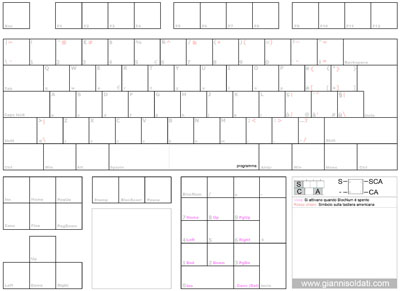
This keyboard scheme is designed to quickly write down keyboard shortcuts of your favorite program.
Print on a A4 paper and it is ready.
I use a quick way to write shortcuts. S for Shift, C for Ctrl and A for Alt.
Example: Shift + Alt + B to execute a Bevel became "SA Bevel" written on key B.
Believe me this page will be very useful especially with 3d programs like Lightwave and Modo.
There is also an American keyboard overlapped to the Italian one so everyone can use it.


Autocad colors
 
Click this picture to download the pdf.

Description:
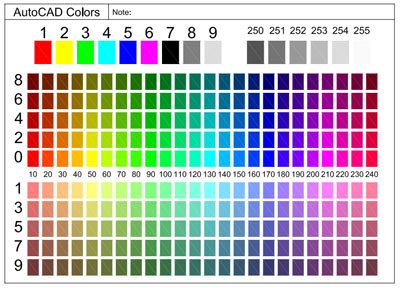
This is a scheme with all the standard colors of Autocad in a single A4.
How many times have you printed your dwg and the colors were all wrong?
Even if you have your monitor calibrated you cannot be sure if the color on paper will be the same that the ones on screen.
If you print this A4 in you printing shop and you ask to the shop to use the same plotter that they will use for your final drawing you can be sure to always get the right colors.
When you draw in Autocad choose the colors from this printed sheet, don't shoose on the screen.


Copyright © Gianni Soldati.
No duplication or reproduction without permission.